
Where the InGo Social Surface appears on your registration confirmation page can have a significant impact on advocacy and referral performance.
For best results, place the Social Surface directly below the registration confirmation message and above the fold, before secondary event information or other calls to action.
An optimized confirmation page should generally follow this order:
- Registration confirmation — “You’re registered!”
- InGo Social Surface — the personalized advocacy experience
- Registration and event details — badge information, add-to-calendar options, agendas, travel information, and other next steps
The Social Surface should also be the primary social-sharing experience on the page. Competing social buttons divide attention and can reduce engagement with the personalized InGo experience.
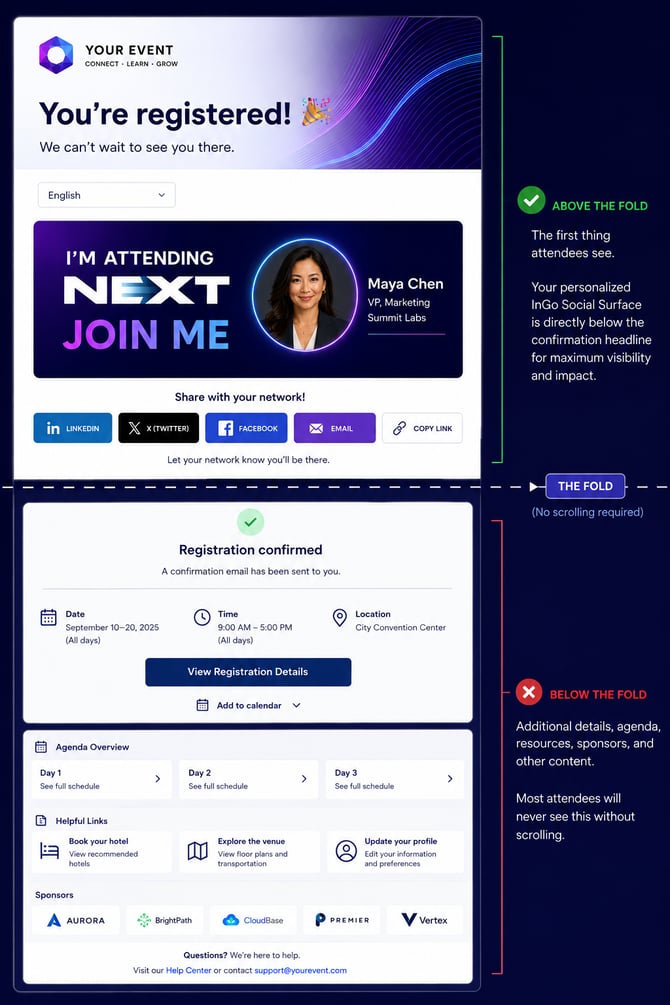
What does “above the fold” mean?
“Above the fold” is the portion of a webpage visible when it first loads, before the visitor scrolls.
The principle is familiar in digital marketing: prominent placement creates a greater opportunity to be seen and acted upon. Just as the highest-visibility positions on a search results page attract more attention, the most prominent content on a confirmation page has the greatest opportunity to drive action.
The Social Surface should therefore be visible within the registrant's initial viewport.
Why the confirmation moment matters
The confirmation page has a specific job: tell the registrant that registration was successful.
Once attendees see that confirmation, their immediate task is complete. Information such as badges, agendas, travel details, and schedules may be important, but it typically becomes relevant later and is often available through email or other event communications.
Advocacy is different.
Immediately after registering, the attendee has just committed to the event and the experience is top of mind. This creates a natural opportunity to invite them to tell their network:
“I’m attending. Join me.”
If the Social Surface is buried beneath secondary information, that high-intent opportunity can be missed.
Technical availability does not guarantee visibility
A Social Surface can be installed correctly and still underperform.
The integration may load successfully, recognize the registrant, display personalized content, and track sharing correctly. But if it appears below agendas, calendar links, sponsor content, or other page elements, registrants may never see it.
Placement is therefore part of implementation quality, not simply a design preference.
This is why placement is reviewed during InGo QA and should be one of the first areas evaluated when an otherwise healthy event has unexpectedly low advocacy activity.
The impact of better placement
InGo has seen events experience substantial increases in referral activity after moving the Social Surface from lower on the confirmation page to directly beneath the registration confirmation.
In some cases, referral clicks have increased by multiples rather than incremental percentages.
The integration did not change. The audience did not change. The opportunity simply became more visible.
Before an experience can convert, it first has to earn attention.
The 30-second placement test
Complete a test registration using the same path as an attendee. When the confirmation page loads, do not scroll.
Check that:
- The InGo Social Surface is immediately visible.
- It appears directly below or in close proximity to the registration confirmation.
- Other social-sharing prompts are not competing with it.
- The experience remains above the fold at common desktop and mobile viewport sizes.
A simple rule:
If you have to scroll to find the Social Surface, move it higher.
How to fix Social Surface placement
In most registration platforms, repositioning the Social Surface does not require reinstalling the InGo integration. Typically, it only needs to be moved higher within the confirmation page or template.
The target structure is simple:
Registration confirmation → InGo Social Surface → everything else
If you're unsure how to change the placement on your registration platform, contact support@ingo.me or your InGo Account Manager. Our team can review your live registration path and recommend the appropriate placement.
You can also book time with our support team.