
Overview and Guide
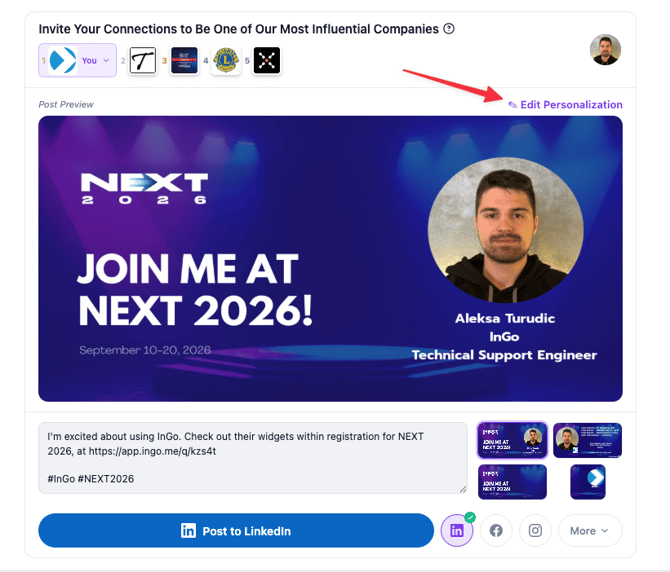
Before sharing your post, you can review and update your displayed name, job title, company, or headshot/company logo directly from the Social Surface. Changes appear immediately, so there's no need to recreate your post.
Edit Your Post
-
Click the Edit Personalization icon (the pencil) in the upper-right corner of your post.
-
Update your first name, last name, job title, or company.
-
Click Save to save your changes.
Your updated information will appear on your post right away.
Update Your Headshot or Company Logo
You can also change the image on your post from the same Edit Personalization window. Whether that image is your headshot or your company logo depends on the post layout the event organizer has selected for the event:
| Post layout selected by the organizer | What your post shows | What Upload Photo updates |
|---|---|---|
| Personalized with Person | Your headshot | Your headshot |
| Personalized with Logo | Your company logo | Your company logo |
- Click the Edit Personalization icon (the pencil) in the upper-right corner of your post.
- Click Upload Photo and select your new headshot or logo.
- Click Save to save your changes.
Your post shows either a headshot or a logo, not both. For example, if your post shows your company logo, Upload Photo replaces the logo. You can't add a headshot to that layout.
For the best result, use a clear, high-quality image.
If You're Updating Your Information Frequently
In most cases, updates should carry over to future posts. However, if you find yourself correcting the same information before every event or campaign, please contact support@ingo.me so we can help investigate the issue further.
Need Help?
If you have any questions or run into issues, please contact support@ingo.me. We're happy to help.