
By default, the Login Widget shows the social network options (for example, LinkedIn and Facebook) first, with the Email option below them. If you'd like Email to be the first option, switch the widget's Layout from standard to inverted.
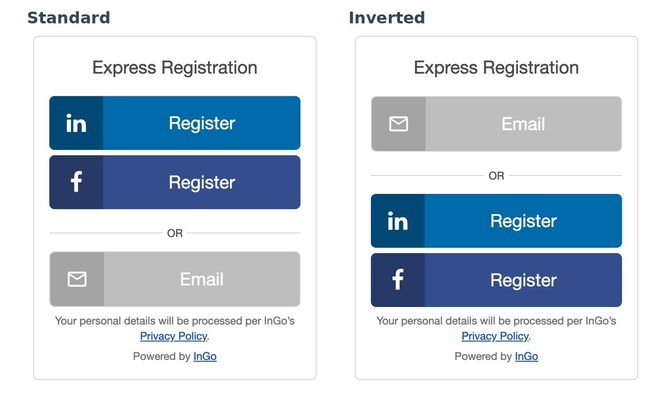
The inverted layout works whether the Email option shows as a link or as a button. To display it as a button or change its color, see Display the Manual Registration Option as a Button.
IMPORTANT: The layout is set per group. Each group in your event has its own Login widget, so update every group that should show Email first.
Step 1: Open Widget Configuration
- On the Event Summary page, click Configure and select Widgets
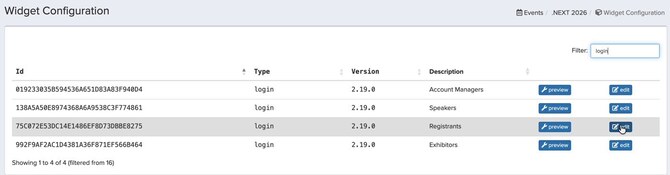
- In the Filter box, type login. Only the Login widgets are listed, one per group
Step 2: Edit the Group's Login Widget
- Find the group you want in the Description column
- Click edit next to it
Step 3: Change the Layout
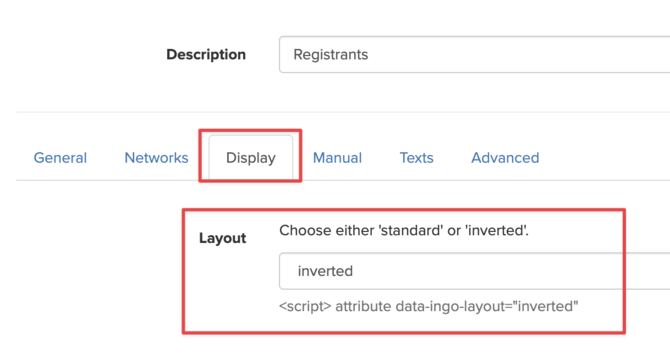
- Go to Display tab
- In the Layout dropdown, select inverted
- Scroll to the bottom of the page and click Save
Repeat Steps 1 to 3 for each group that should show Email first.
PRO TIP: Want Email at the top as a button in your brand color? Combine both settings. Set Layout to inverted (this article), then on the Manual tab check Display manual registration option as a button and enter your color code in Manual registration button color. See Display the Manual Registration Option as a Button.
Showing Email at the Bottom Again
To go back to the default order, open the group's Login widget, go to the Display tab, set Layout to standard and click Save.
Important Notes
- Changes may take a few minutes. If you don't see the new order on your page right away, refresh it or open it in a private browser window.
- New groups use the standard layout. Groups created later get their own Login widget, so update the layout for each new group.
Frequently Asked Questions
Does the inverted layout work if Email shows as a link?
Yes. Inverted moves the Email option to the top whether it shows as a link or a button.
Will this change the order of the social network buttons?
No. Only the Email option moves. The social network buttons keep their order below it.